
Monitoring & Prioritisation
Assess patch status, services and agent status in daily operations faster.

OPERATIONS · EVIDENCE · CONTROL
Combine IT and OT in one operational overview – prioritise anomalies faster and document them in a traceable way.
Assess patch status, services and agent status in daily operations faster.
Structure histories, inventory and reports for agreed audits.
Make connections, approvals and responsibilities traceable.
What matters is not seeing as many notifications as possible. What matters is being able to place the right information for the responsible role in the right work context.
Patch status, service notes and agent signals are often located in separate work views. What needs attention first then has to be assembled manually.
Assets, systems and responsibilities are often known. Their relevance to ongoing operations, however, cannot be assessed at a glance.
Histories, backups, inventory and access questions are often only assembled for an incident, a status meeting or an agreed audit.
The dashboard does not create blanket security. It supports structuring agreed data sources, priorities, roles and evidence in a shared operational view.
SOLUTION
Instead of assembling information for day-to-day work, coordination and evidence in separate views, the product-native overall view combines status, health indicators, patch information and prioritised notes.
See the work process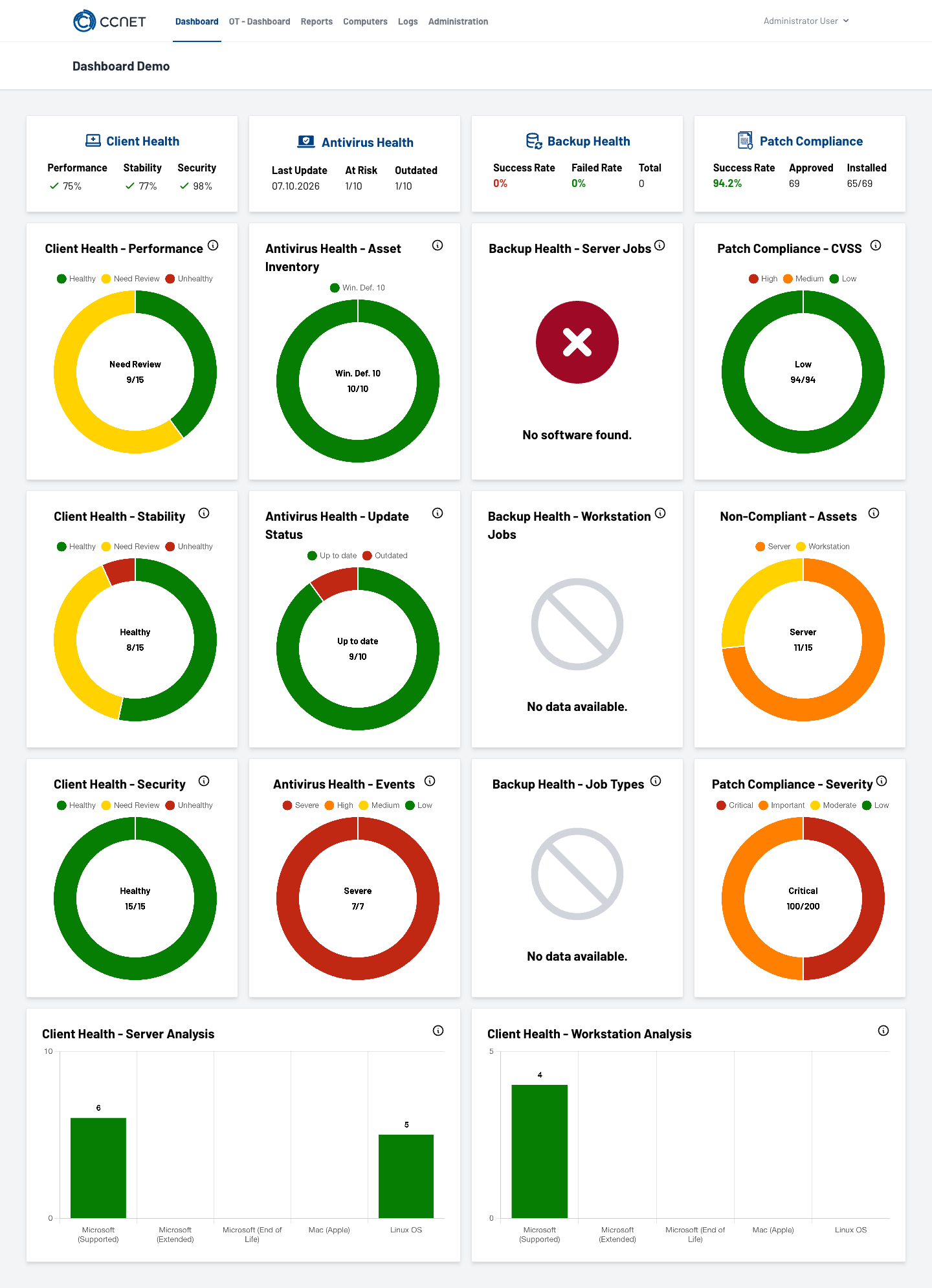
Bring patch status, service status and agent notifications into an actionable order.
Bring installation, update, backup and inventory into a clear historical context.
Combine roles, approvals and the appropriate work context for management, service and audit.
Example view
Switch between operational status, evidence and access. All figures serve exclusively to demonstrate the possible information structure.
01 · DAILY MONITORING
02 · AUDIT & REPORTING
03 · ACCESS & ROLES
A prioritised view on patch status, critical services and agent status of the connected systems.
Installation timestamps, backup logs, inventory and reports as the basis for responsible parties and agreed audits.
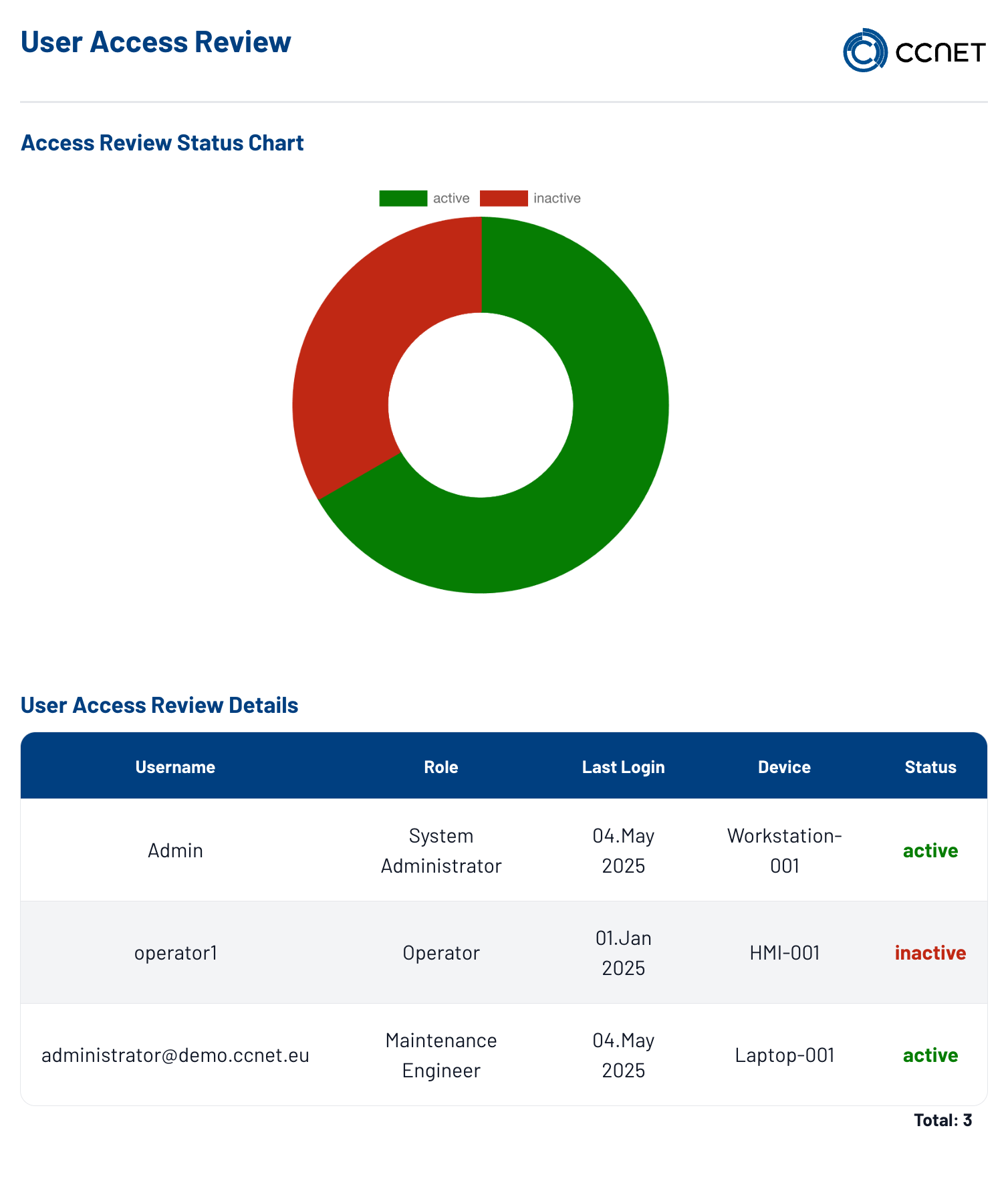
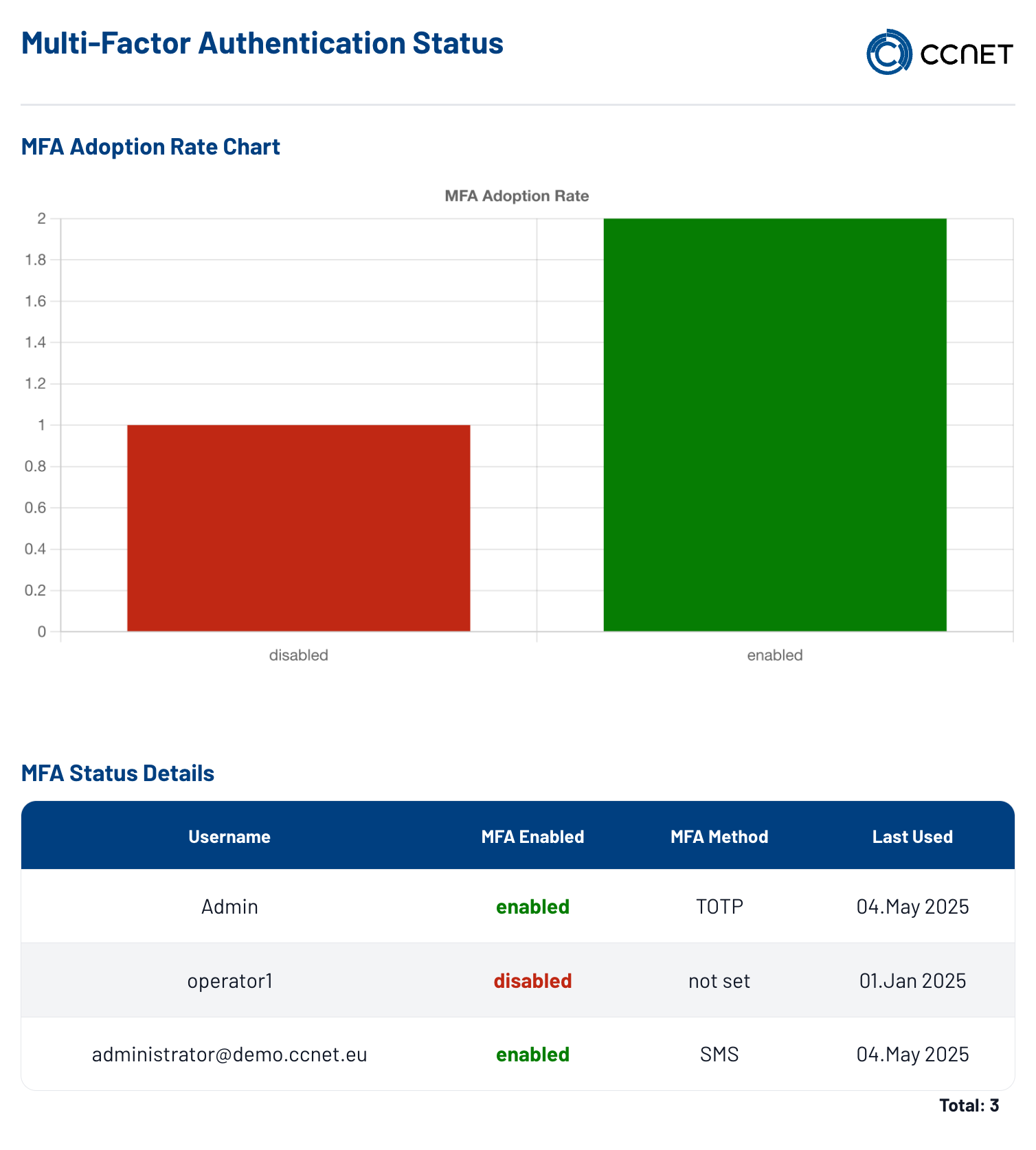
Make roles, approvals and connection processes visible – for example for service, administration and external audits.
CONTROL POINTS
When relevant data is located in different systems, the shared basis for assessment is often missing. A service installed on endpoints and servers can transfer agreed machine data into the data set, assess it and prepare it as an evidence or report structure.
Make version and installation timestamps visible in the agreed evidence.
HistoryClassify status and logs for servers and clients in a structured way.
EvidencePrioritise critical services, agent notifications and alarm chains.
MonitoringKeep an eye on system stock and deadline-related notes.
TransparencyClassify connections, approvals and responsibilities in a traceable way.
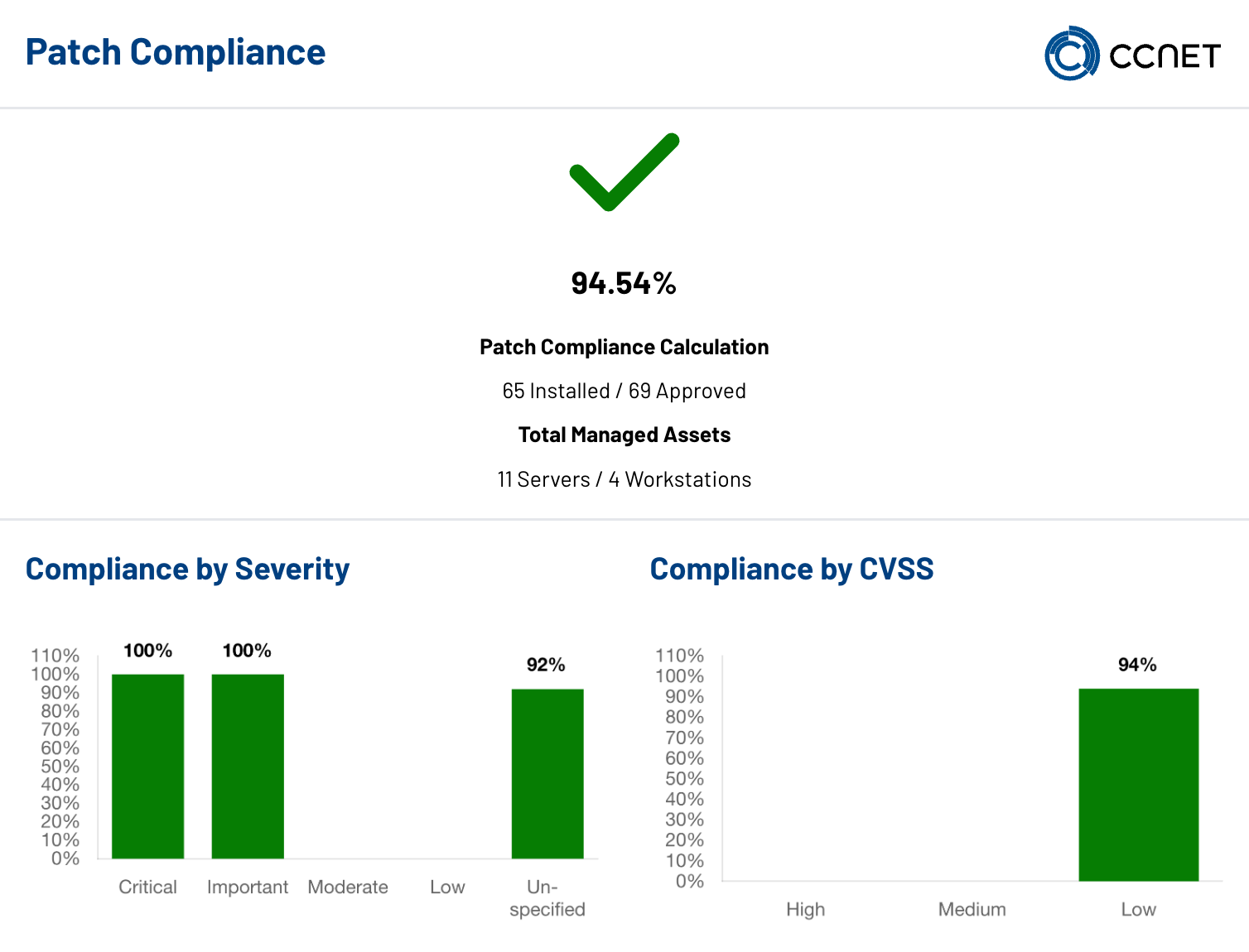
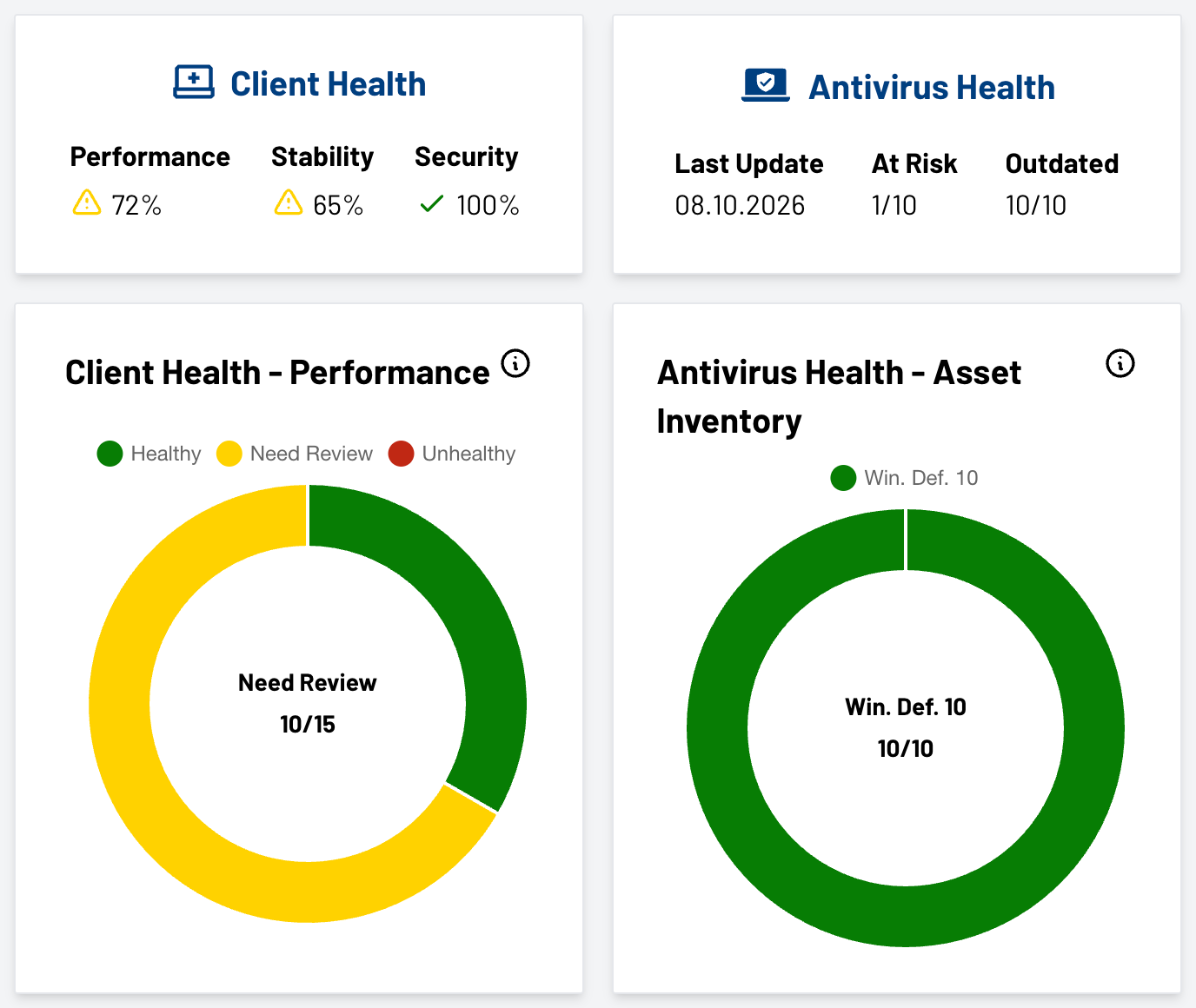
ControlThe view exemplifies how patch and risk status can be bundled in a work and evidence view.
WORKFLOW
The dashboard transfers technical information into a coordinated work and evidence process. Each stage remains aligned with data sources, responsibilities and the agreed target picture.
 CURRENT STEP01020304
DATA SOURCE
ASSESSMENT
RESPONSIBILITY
EVIDENCE
A service installed on connected endpoints or servers delivers the agreed system information as a data basis.
Status values and events are brought into a work context based on agreed rules and ordered by urgency, system or area of responsibility.
The relevant role receives the information in the appropriate perspective – for example IT operations, administration, service or management.
Status history, timestamps and agreed control points can be transferred into appropriate report formats for coordination, incident follow-up and agreed audits.
ACCESS & IDENTITIES
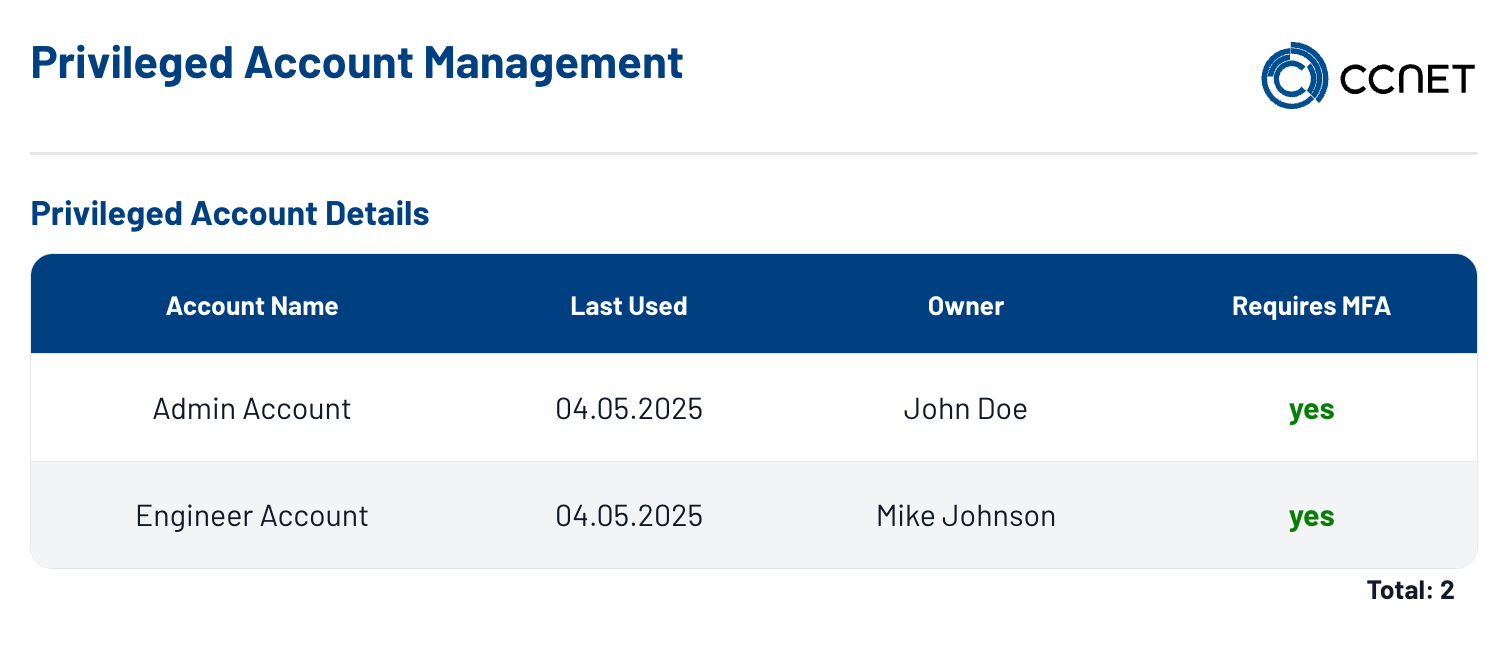
Roles, approvals and connection processes can be transferred into a project-specific work view. Responsible parties see which access questions require an audit or coordination, instead of assembling information from individual permission and status sources.
OT & ASSETS
Asset types, communication protocols and agreed status questions can be combined with the operational overview. Energy and efficiency perspectives are possible deepening, not an independent product promise.
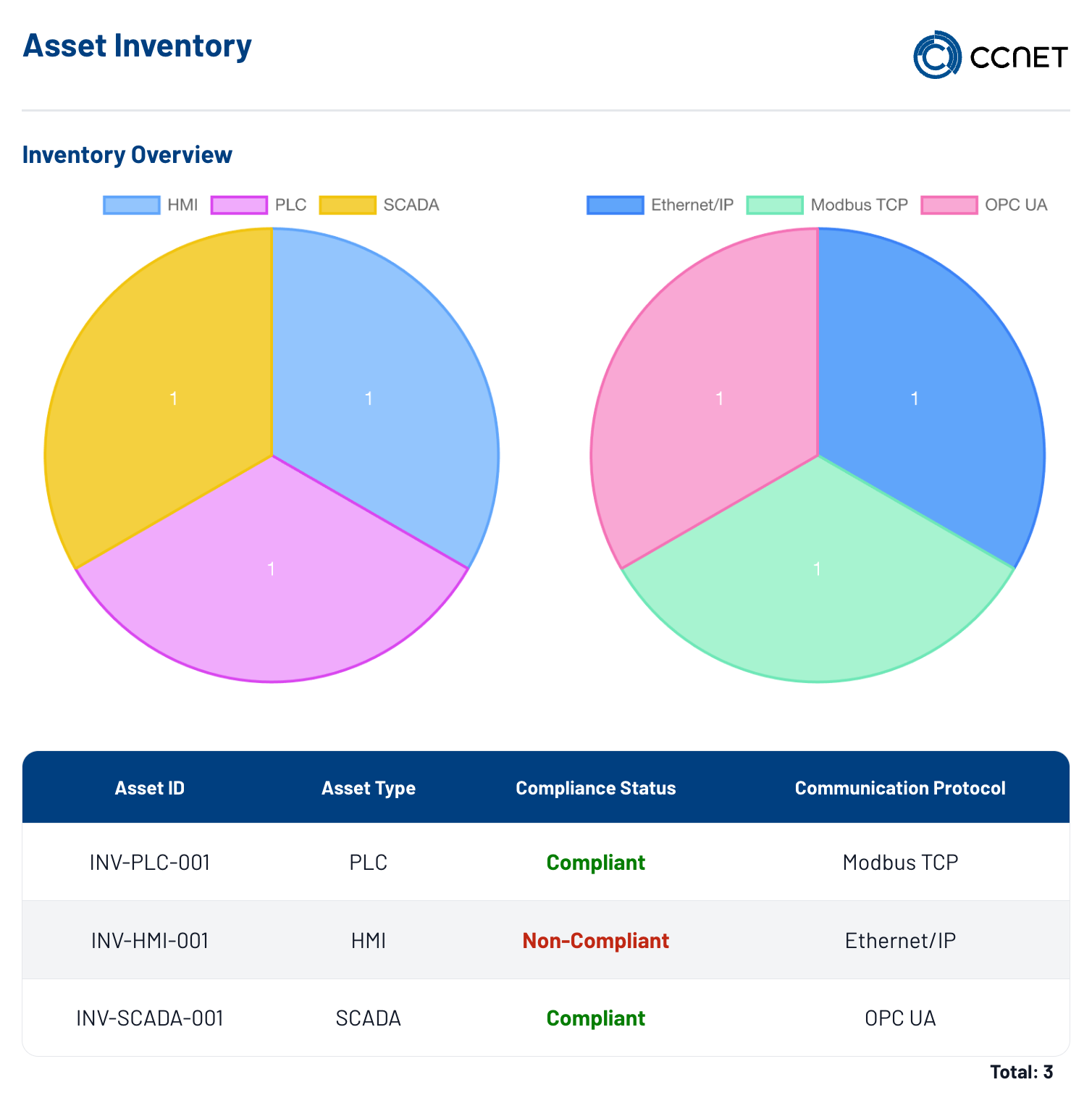
The OT perspective helps transfer relevant systems, responsibilities and possible priorities into an understandable structure. CCNet clarifies data sources, thresholds and the desired visibility with the responsible roles.
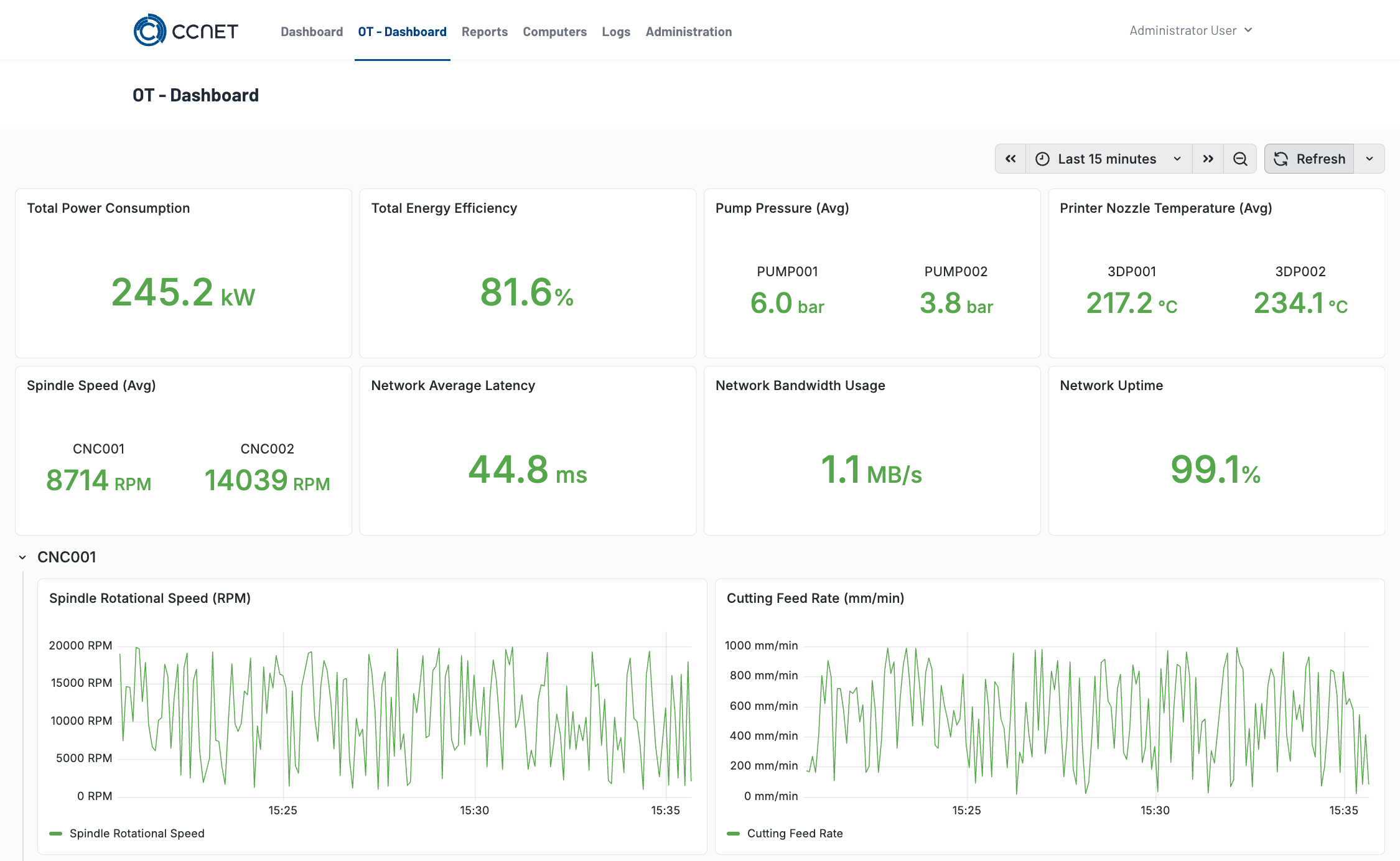
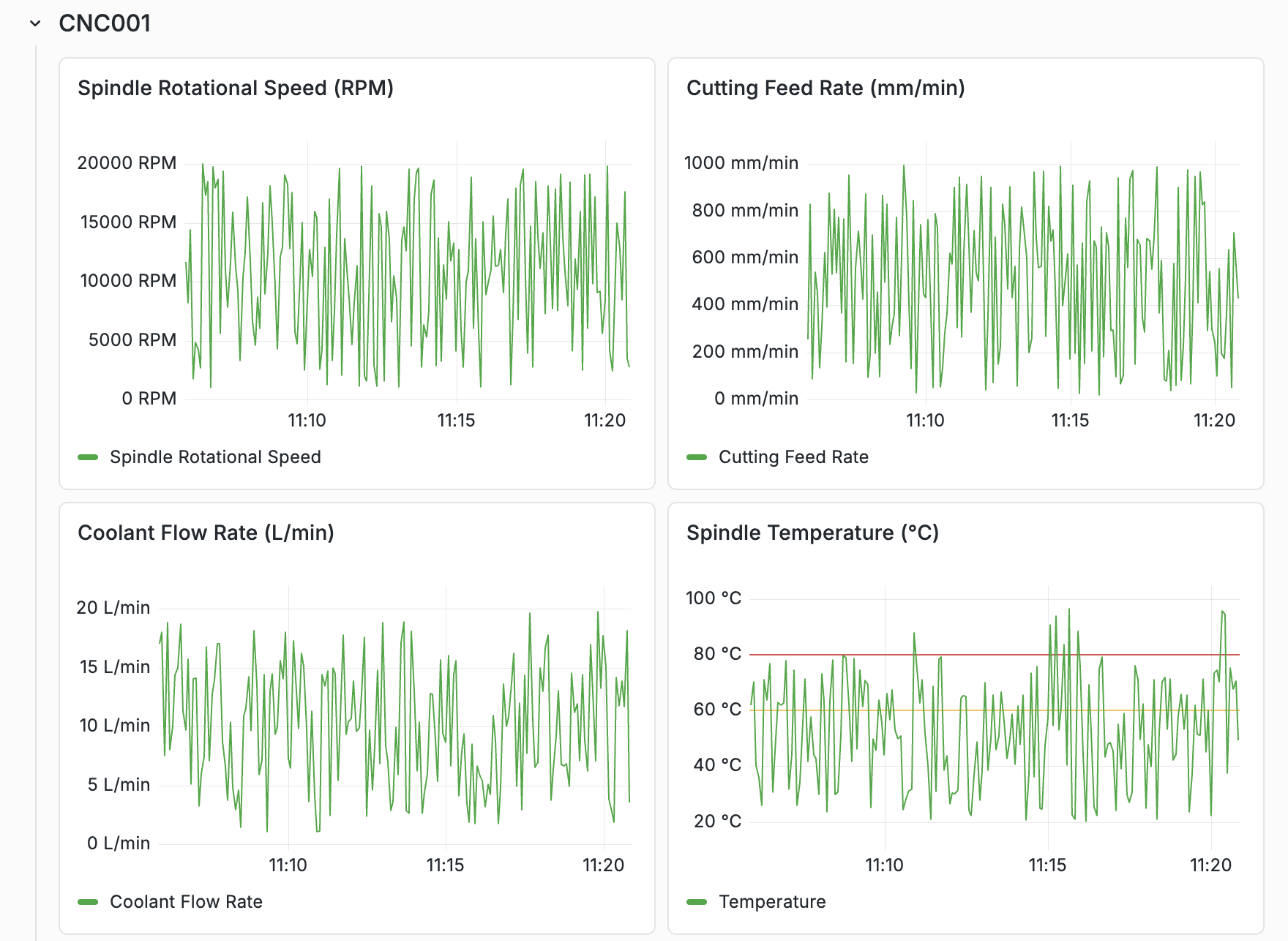
The OT overview places power consumption, efficiency, pressures, temperatures and speeds of the assets next to network latency, bandwidth and availability – as current values and as trends. Which metrics appear is defined within the project.
EVIDENCE
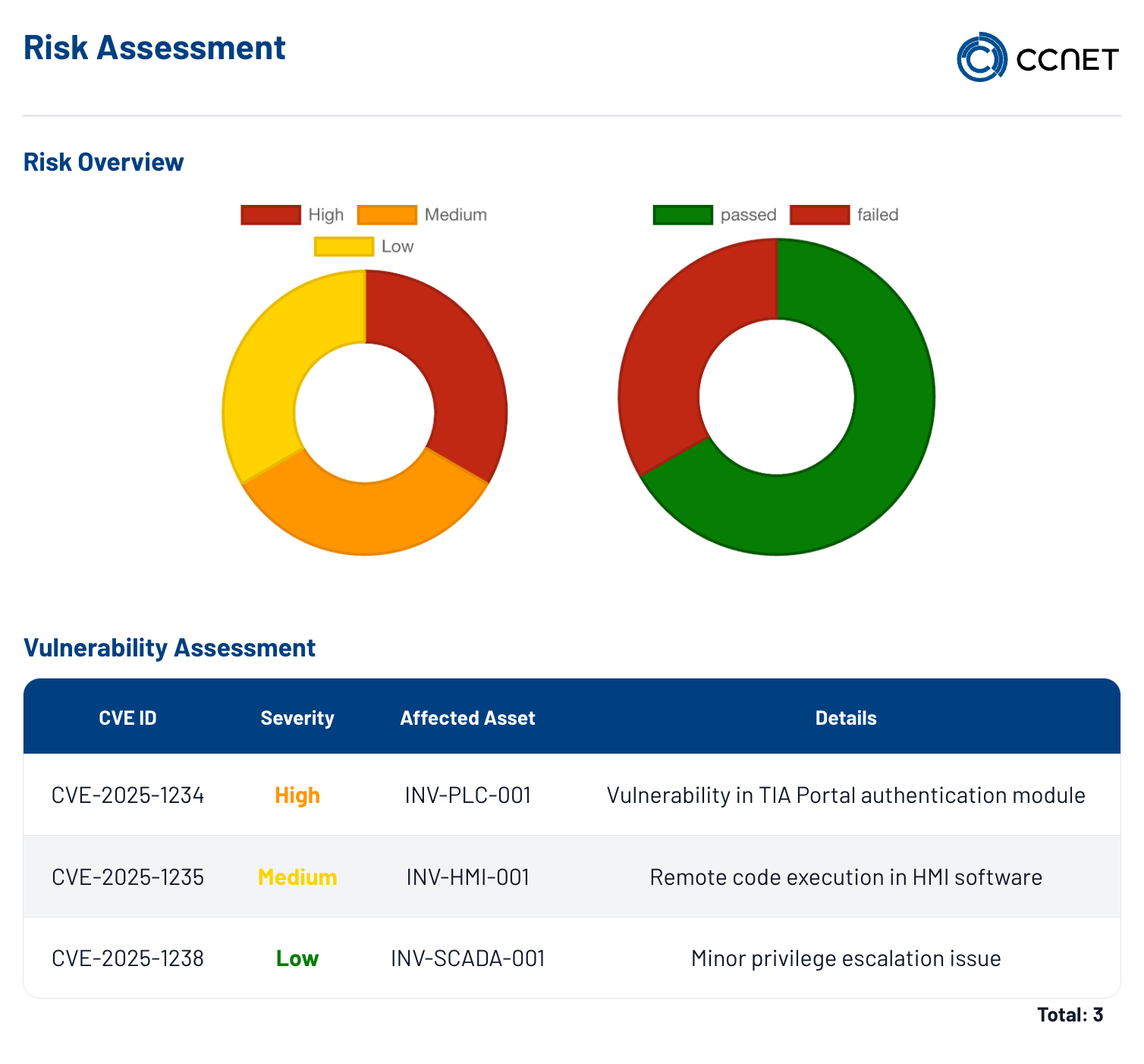
Patch and update status, backups, alarm chains, inventory data and documentable access can be combined as a shared basis. This supports day-to-day work, incident follow-up and the preparation of agreed audits.
USE CASES
Three typical starting points show how technical information for different areas of responsibility can be transferred into a traceable work context.
Status from endpoints, servers, monitoring, patch and update processes, backup logs as well as inventory can be combined in a shared solution view. IT operations structures daily notes, narrows down affected systems and prepares coordinated alarm or escalation routes.
Agreed signals from machine environments, connected systems or monitored services can be classified by relevance, location or area of responsibility. Production management receives a clear work basis for which notes require observation, coordination or prioritised processing.
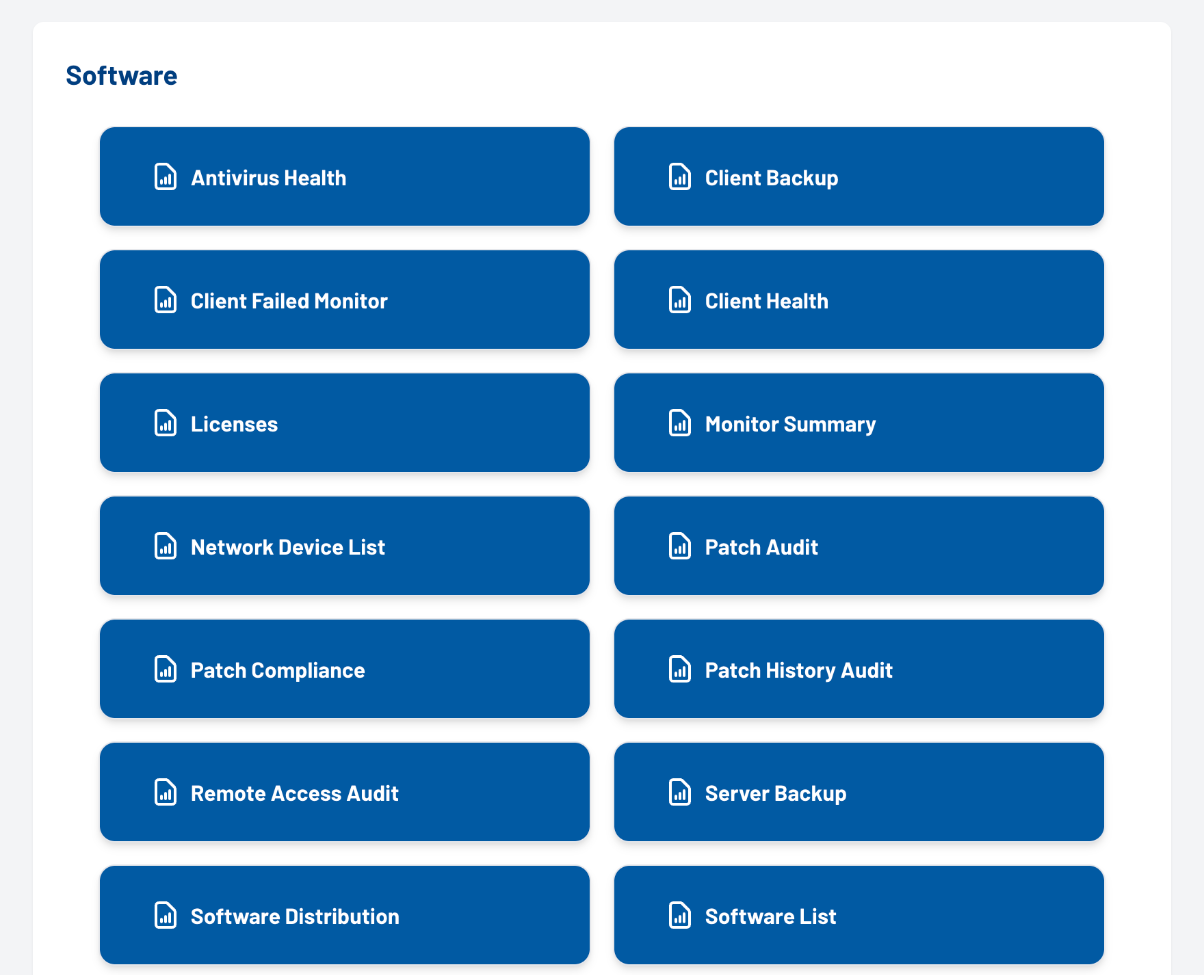
Agreed timestamps, status histories, backup logs, inventory and license overviews as well as documentable access can be transferred into a traceable report and evidence structure. Responsible parties receive a coordinated basis for status meetings, incident follow-up and the preparation of agreed audits.
CCNet defines status questions, data connections, permissions, report views and operational processes with the responsible roles. Events can be handed over to a controlled communication space if required.
CCNet jointly clarifies relevant data sources, responsibilities, thresholds and alarm routes. Target picture, technical scope, role model and rollout are adapted to the operational environment.
CCNet clarifies information needs, evidence structure, roles, permissions and the desired report depth. The dashboard does not replace an independent audit or certification, but can support its preparation in a structured way.
REFERENCES
The selection is grouped by deployment environment. It serves as an approved trust evidence and makes no statement about individual project scopes.





INTEGRATION
In the target picture, a notification for a detected offline situation of an agent can be handed over to a controlled emergency channel, for example via the secure messenger Rocket.Chat. CCNet combines data source, rule set and operable communication space; target systems and escalation routes are defined jointly.
Discuss the integration+
OUR ROADMAP
The rollout combines specialist requirements, available data sources, responsibilities and a suitable operational model. Scope and report depth are defined project-specifically.
Classify status questions, roles and necessary evidence jointly.
Discuss relevant dashboard perspectives based on your target picture.
Coordinate data sources, permissions and reporting structure.
Continuously further develop control points, analyses and operational processes.
FAQs
The answers provide initial orientation. The concrete scope is always adapted to data sources, roles, requirements and the planned operational model.
The Security Solution Dashboard is a conceptual interface that combines status, history and agreed control points from connected systems in an understandable way. It supports IT operations, responsible parties and management in classifying information; scope and data basis are defined within the project.
Which systems are integrated is defined jointly in the target picture. Possible, for example, are information from endpoints, servers, monitoring, patch and update processes, backup logs, inventory or agreed access processes, provided the respective data source is available.
For the automatic recording of system information, a service installed on connected devices and servers can be used. Whether an agent is required, which data it should deliver and which systems are connected is coordinated before the rollout.
Depending on the target picture, among other things patch and update history, service status, backup evidence, inventory, license deadlines, alarm notes, roles and documentable access can be displayed. The condensation differs by role and area of responsibility.
The dashboard can structure agreed evidence, historical timestamps and report formats. It does not replace an independent audit or certification, but can support the preparation of status meetings, audits and documentable control points.
The view shows example data only. In a later implementation, currency, data volume and display depend on the agreed data sources, connections and operational processes.
Roles, permissions and, where applicable, external connection processes can be displayed in a traceable way in the agreed target picture. Which information is visible and who may see it is defined project-specifically through the role and permission concept.
Yes, a project-specific handover to an emergency channel or another target system can be planned as an integration approach. However, triggers, prioritisation rules, target systems and escalation routes are defined jointly before implementation; this is not a standard package.
Next step
CCNet clarifies with you relevant data sources, roles, thresholds, reports and possible integrations – matching your organisation and infrastructure.